

Project Status: under development
About this project
This project is a JavaFx map view. It is based on the project gluon-oss-maps.
Gluon Maps:
- Requires the MapView to be part of a Scene
- Works asynchronously
I want to save map images to a file and then these properties aren’t very handy.
That was the reason for me to start this project, which also provides a MapImage for storing a map image to a file.
Functionality
What is shown on the map view is determined by:
- The center of the map.
- The zoom level of the map.
- The width and height of the map.
- The layers that are added to the map.
There are two implementations:
- goedegep.mapview.view.MapView
This implementation provides an interactive map. Where you can zoom in and out and pan using the mouse. The map tiles are loaded asynchronously.
The size of the map is determined by its parent container, and the map will automatically resize when the parent container is resized. - goedegep.mapview.image.MapImage
This implementation is meant for creating a map and save it to an image file. It does not react to mouse events and loads the map tiles synchronously.
This size of the map has to be set explicitly.
Functionality shared by MapView and MapImage
- Center of the map
The center of the map can be set and retrieved using thesetCenter()andgetCenter()methods. The center is represented as aMapPointwhich contains the latitude and longitude of the center point of the map. - Zoom level
The API provides methods to get and set the zoom level;getZoom()andsetZoom().
The zoom levels range from 0 to 19 (the range supported by Open Street Map) - Width and height of the map
The width and height of the map can be retrieved using thegetDimensions()method. - Layers on the map
Layers can be added to the map using theaddLayer()method and removed using theremoveLayer()method. Layers are displayed in order of addition, with the last added layer to be on top.
Utility methods
A number of utility methods are provided, which are mainly meant for the implementation of map layers.
getMapPosition()
This can be used to get the position on the map, as aMapPoint, for given scene coordinates.
When the user clicks on the map, you can use this method to convert the scene coordinates of the mouse click to map coordinates, and then add a marker at that position.getMapPoint()
This is the inverse of the getMapPosition() method.
It can be used to get the position on the map, as aPoint2Dwith scene coordinates, for given latitude and longitude.
This is useful when you want to draw a marker on the map for a specific latitude and longitude.getVisibleMapBoundingBox()
This returns aWGS84BoundingBoxwhich covers the visible map area. This is useful for filtering the items to be shown on a map layer.
MapView functionality
- Center of the map
The center of the map can be updated by dragging the map with the mouse. - Zoom level
The zoom level can be changed by using the mouse wheel. In this case zooming is centered around the mouse cursor position, so the map will zoom in or out towards the position of the mouse cursor.
The zoom level changes in steps of 0.1, or 1.0 if the Control Key is pressed. - Width and height of the map
The width and height of the map are determined by the size of the parent container. The map will automatically resize when the parent container is resized. - Fly to a location
The API provides a method to fly to a location on the map (flyTo()). The map will then animate the transition to the new center and zoom level.
MapImage functionality
- Width and height of the map
The size of the map has to be set explicitly using thesetSize()method.
Implementation ideas
Use less listeners. In the current implementation ‘updating’ part happens too often.
Try to have a single zoom implementation. setZoom zooms around the center, zoom with mouse around mouse pointer
zoom in/out via API or mouse, panning, resizing
delete/add tiles
update tiles
update center
update size (only when resizing and happens automatic)
update layers
Dirty handling
A layer requests update if its contents changes, items to be shown are updated before requesting update
A layer needs an update if any of the map view paramenters change, items to be shown may change
If a layer requested an update, base map doesn’t have to be updated.
Dependencies
TileImageViewAbstract – no dependencies
mapview.TileImageView – no dependencies, provides progress
image.TileImageView – no dependencies
TileRetriever – interface
OsmTileRetriever – no dependencies
CachedOsmTileRetriever – no dependencies
Implementation
The following diagram shows the classes of the implementation.
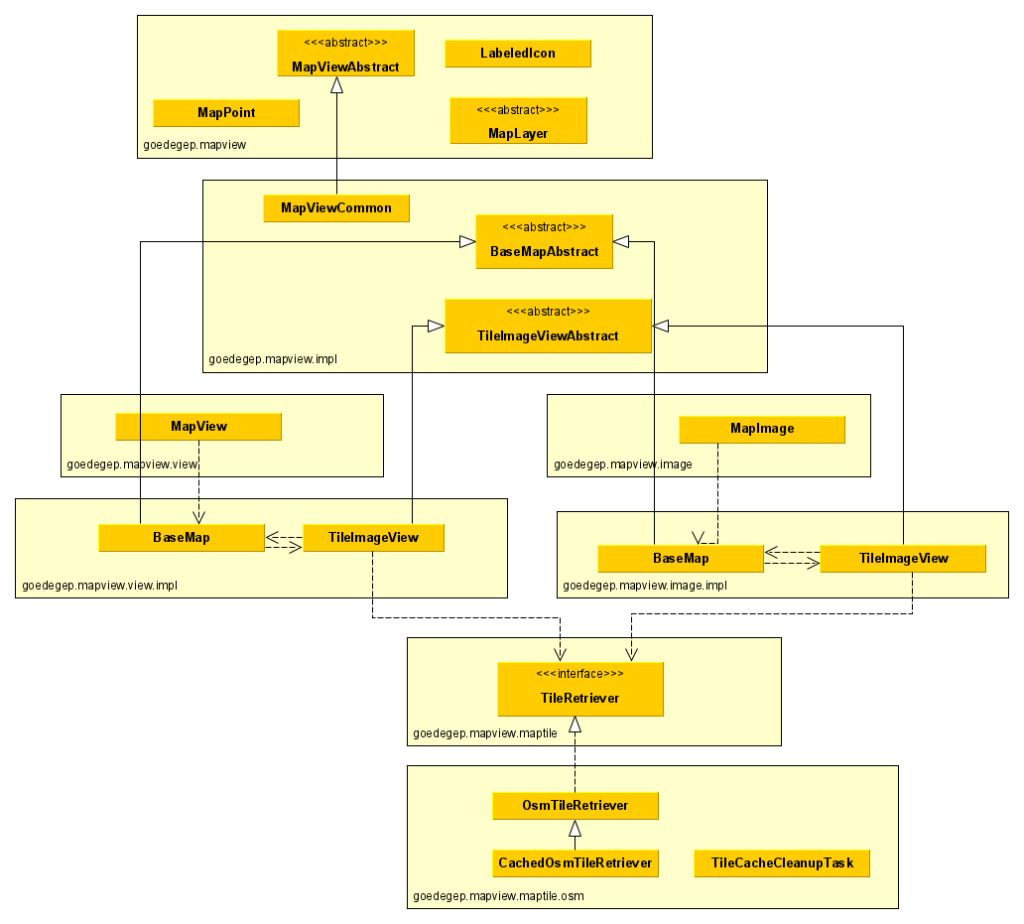
Package goedegep.mapview
MapViewAbstract
This is the main class of a map view, defining the interface which is common for a MapView and a MapImage and it is a (extends) javafx.scene.layout.Region, so you can directly add it to your GUI.
MapPoint
This class defines a point on the map via its latitude and longitude.
MapLayer
This abstract class shall be extended for the creation of your map layers.
LabeledIcon
This class can be used to show icons with a label on your map layer.
Package goedegep.mapview.impl
MapViewCommon
This class implements the common part of the map view.
It has a reference to a base map (BaseMapAbstract), which is actually a goedegep.mapvie.view.impl.BaseMap or a goedegep.mapview.image.impl.BaseMap.
BaseMapAbstract
This class provides the common functionality for a base map (the map tiles).
TileImageViewAbstract
This class provides the common part of a map tile.
Package goedegep.mapview.view
MapView
This is the map view implementation.
Package goedegep.mapview.view.impl
BaseMap
This class is the base map for a MapView.
TileImageView
This class is a tile for the BaseMap.
Class goedegep.mapview.view.impl.TileImageView
This TileImageView loads its map tile image asynchronously, which adds quite some complexity.
The tile is loaded using a TileRetriever.
Class goedegep.mapview.image.impl.TileImageView
This TileImageView loads its map tile image synchronously.
The tile is loaded using a TileRetriever.
Interface goedegep.mapview.maptile.TileRetriever
This interfaces defines the methods for retrieving map tiles.
There are two methods for retrieving tiles: one asynchronous and one synchronous.
Implementations may fetch the tiles directly from the tiles server, or they can cache the tiles on local storage.
CompletableFuture loadTile(int zoom, long i, long j)
This asynchronous method returns a CompletableFuture that will complete with the tile image once it is loaded.
Image loadTileSynchronously(int zoom, long i, long j)
This synchronous method blocks until the tile is loaded and returns the image directly.
Class goedegep.mapview.maptile.osm.OsmTileRetriever
This is an implementation of the TileRetriever interface that fetches the tiles directly from the OpenStreetMap (OSM) tile server.
The OpenStreetMap tile server provides map tiles in the format of PNG images, which can be accessed via a URL pattern. This class constructs the appropriate URL for the requested tile and loads the image synchronously or asynchronously.
In the requests to the OSM tile server a User-Agent is set. For this the application has to set the system property “http.agent”. If this isn’t set a warning will be logged and a default value will be used. This may lead to requests being denied from the server.
Class goedegep.mapview.maptile.osm.CachedOsmTileRetriever
This class is an implementation of the TileRetriever interface that caches tiles on the file system.
This class extends the OSMTileRetriever, which it uses to retrieve the tile data from the OpenStreetMap (OSM) tile server.
Calculations
The implementation is based on OSM map tiles. See Zoom levels to learn more about the OSM zoom levels.
At zoom level 0, there is one tile covering the whole earth. At each higher level, each tile is split in 2 by 2 tiles. So the number of tiles (n) in each direction at zoom level z is:
n = 2 ^ z
Furthermore for the map the Mercator projection is used.
Let the center location of the map be specified by its latitude (latdegrees) and longitude (londegrees), both in decimal degrees.
The tile index in the x direction is:
xtileindex = n / 360 * (180 + londegrees)
The longitude range is: -180 .. 180 degrees. So with this calculation, for londegrees equals -180 degrees, xtileindex is 0. For londegrees equals +180 degrees, xtileindex is n.
The Mercator formula is based on radians, so we convert the latitude from degrees to radians. 360 degrees equals 2 π radians, so π radians equals 180 degrees.
latradians = π * latdegrees / 180
The Mercator formula is:
y = R * ln(tan(π/4 + latradians/4)) or y = R * ln(sec(latradians) + tan(latradians))
As sec(latradians) = 1/cos(latradians) the formula can also be written as:
y = R * ln(tan(latradians) + 1 / cos(latradians))
Which is the format used in the implementation.
If you want to know more about map projections, read An Album Of Map Projections.
Functional
Covering tiles
If a tile to be shown isn’t available yet, and the tile of the next lower zoom level that covers this tile is available, then this tile is shown.
The method loadTiles() in the BaseMap installs all needed tiles. If a tile isn’t in its tile map, it creates a new MapTile. It assumes that this may take some time, so it calls getCoveringTile() to try to obtain the covering tile from the tile map. If there is a covering tile, the tile is added to the coveredTiles of the covering tile and the covering tile is added to the children of the BaseMap. The tile itself is always added as a child of the BaseMap.
The covering tile listens to the progress of the covered tiles. If a covered tile becomes available, it is removed from the coveredTiles. If