

This page describes how to create a JavaFx application as a maven project which creates a Windows installer.
Basics
We start with a simple single module example.
Although the actual project will use maven, we first use the plain tools.
Using jlink
Also read the jlink information:
Jlink – Assemble and Optimize a Set of Modules
Creating Runtime and Application Images with JLink
Note: when you run jlink, the output directory shall not exist yet.
Note: When you have a maven project, you cannot use your ‘target’ folder as module path, because then jlink will find your modules more than once. Once in the jar file and once in the generated classes.
With jlink you can generate a .bat file to execute your application. You can tell Windows to open files with a specific extension with this .bat file, but the .bat file doesn’t have an icon. You can create shortcut to your .bat file and set an icon for that shortcut, but files with the coupled extension don’t show up with that icon.
To have files with the icon of the application, you have to have a .exe file.
Using jpackage
Also read the jpackage information:
The jpackage Command
JPackage
A full application
The GPXEditor is used as an example.
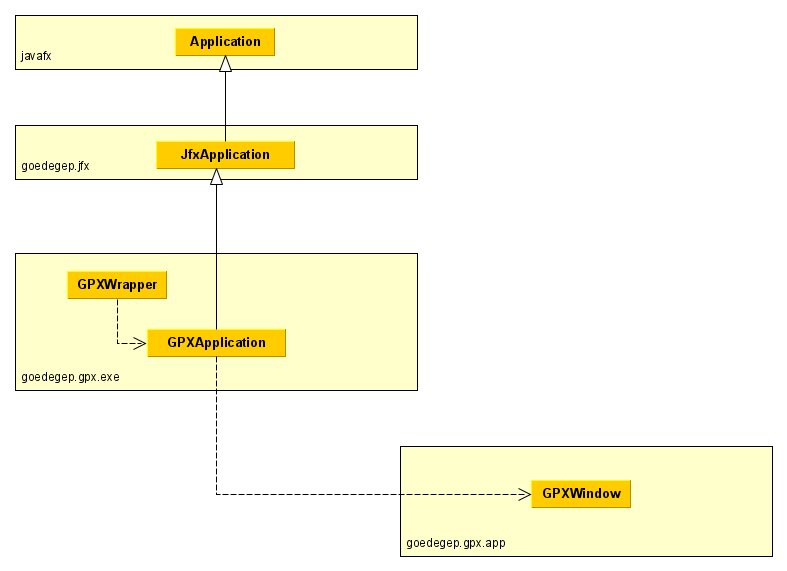
Project/package goedegep.gpx.exe
The reason that this is a separate project is related to the build. All my eclipse projects use java modules, except these .exe projects. I haven’t found a good way to use maven to build an installer in a project based on modules.
The main method is in the GPXWrapper. This doesn’t do anything, except calling the GPXApplication (that why it’s called a wrapper). The reason for having this wrapper is a problem with JavaFx in an executable. If the main class is the subclass of javafx.stage.Stage, the executable doesn’t do anything.