

This page describes how to create a JavaFx application as a maven project which creates a Windows installer.
Basics
We start with a simple single module example.
Although the actual project will use maven, we first use the plain tools.
Using jlink
Also read the jlink information:
Jlink – Assemble and Optimize a Set of Modules
Creating Runtime and Application Images with JLink
Note: when you run jlink, the output directory shall not exist yet.
Note: When you have a maven project, you cannot use your ‘target’ folder as module path, because then jlink will find your modules more than once. Once in the jar file and once in the generated classes.
With jlink you can generate a .bat file to execute your application. You can tell Windows to open files with a specific extension with this .bat file, but the .bat file doesn’t have an icon. You can create shortcut to your .bat file and set an icon for that shortcut, but files with the coupled extension don’t show up with that icon.
To have files with the icon of the application, you have to have a .exe file.
Using jpackage
Also read the jpackage information:
The jpackage Command
JPackage
Concepts
JavaFx Windows executable
If your main class is the subclass of javafx.application.Application, the executable doesn’t do anything. So your main class has to be a wrapper around your subclass of javafx.application.Application. See the class MarkdownWrapper in the example below.
Logging
For logging I use java.util.logging. It does what I need and it doesn’t introduce extra dependencies.
During development, when I run my application in Eclipse, I don’t log to a file, only to the console. Logging to a file causes only extra overhead. For this I have utility class goedegep.util.RunningInEclipse, which has a single static method runningInEclipse(), which returns true if the application is running in Eclipse.
A full application
The Markdown editor is used as an example.
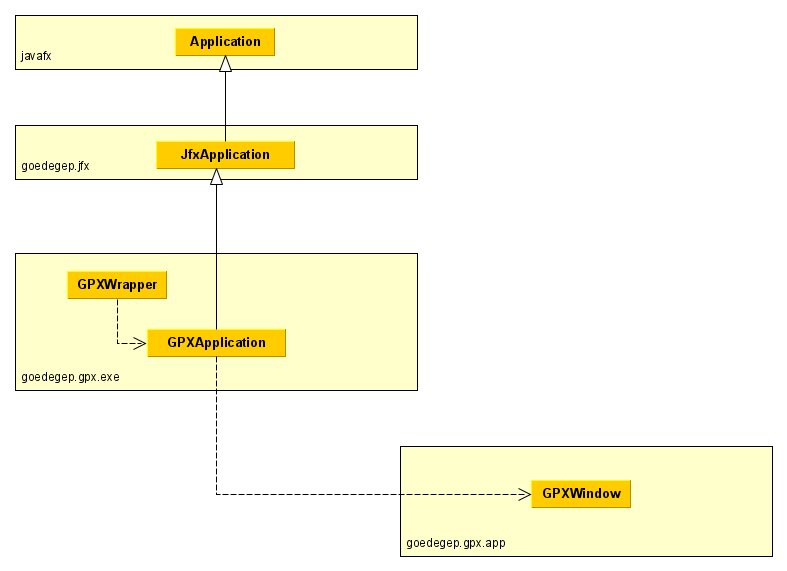
Project/package goedegep.markdowneditor
This project is a simple Markdown editor/viewer. It shows the Markdown text on the left and the formatted text on the right.
packages
Although this is a simple application, I use the following standard packages:
- goedegep.markdowneditor.exe
Contains the classes to start the application. - goedegep.markdowneditor.svc
Contains only the service. - goedegep.markdowneditor.gui
Contains all classes with a user interface. - goedegep.markdowneditor.logic
Contains functionality.
Classes
Class MarkdownEditorWrapper
The main method is in the MarkdownEditorWrapper class. This doesn’t do anything, except calling the MarkdownEditorApplication (that why it’s called a wrapper). The reason for having this wrapper is a problem with JavaFx in an executable. If the main class is the subclass of javafx.application.Application
package goedegep.markdowneditor.exe;

/*
 * This class is the entyry point for the Markdown editor.
 * <p>
 * This wrapper is needed because if the main class extends from javafx.application.Application the installed executable doesn't work.
 */
public class MarkdownEditorWrapper {

  public static void main(String[] args) {

    MarkdownEditorApplication.main(args);

  }
}
class MarkdownEditorApplication
This is the class which extends goedegep.jfx.JfxApplication (which itself extends javafx.application.Application). So the main method calls Launch() and the actual work is in the start(Stage primaryStage) method.
Command line arguments
The wrapper class passes the command line arguments through to the main method of this class. I have a problem with the use of Application.getParameters(), so in the main method I store the arguments in the static field appArgs.
Logging
The first thing done in the start method is setting up the logging. I only log to a file if the application is not running in the development environment (in my case Eclipse). The method RunningInEclipse.runningInEclipse() is used to check whether the application if running within Eclipse (see class goedep.util.RunningInEclipse).
Class JfxApplication provides the method logSetup(Level level, String logFileBaseName), to set up logging. This method:
- Sets the log level to the specified level
- Installs a MyLoggingFormatter for logging to the console
- If the logFileBaseName isn’t null logging to a file is installed.
The logFileBaseName is obtained by calling MyWorldUtil.createLogFileBaseName(applicationName). The name created by this method is:
<user-home-dir>/MyWorld/<applicationName>/<applicationName>-logfile.
The applicationName is provided by the method getApplicationNameFromApplicationProperties().
Report uncaught exceptions
Uncaught exceptions may occur. These shall be reported to the user and logged.
Handle command line arguments
Next any command line arguments are handled. In this case, if there is at least one argument it is assumed to be the file to be opened.
Start the actual application
The actual application is started by getting an instance of the service and calling the method to open the main window on that service.
Class MarkDownEditorService
This class extends goedegep.myworld.common.Service, which provides the basic functionality for a service.
The MarkDownEditorService is a singleton class, so it has a private constructor. This constructor gets an instance of the MarkdownEditorRegistry.
The method getInstance(), creates the MarkDownEditorService instance and then calls initialize() on this instance. This method of the Service:
- sets development mode if applicable
- handles the application properties
- creates the GUI customization
- handles the user properties